Open sourceMITAngular + Electron
The everyday work of Docker Desktop. Without Docker Desktop.
A lightweight desktop client for any Docker daemon. Containers, images, volumes, networks, compose and logs in one fast window. Built for Docker in WSL, happy with any daemon you can reach.
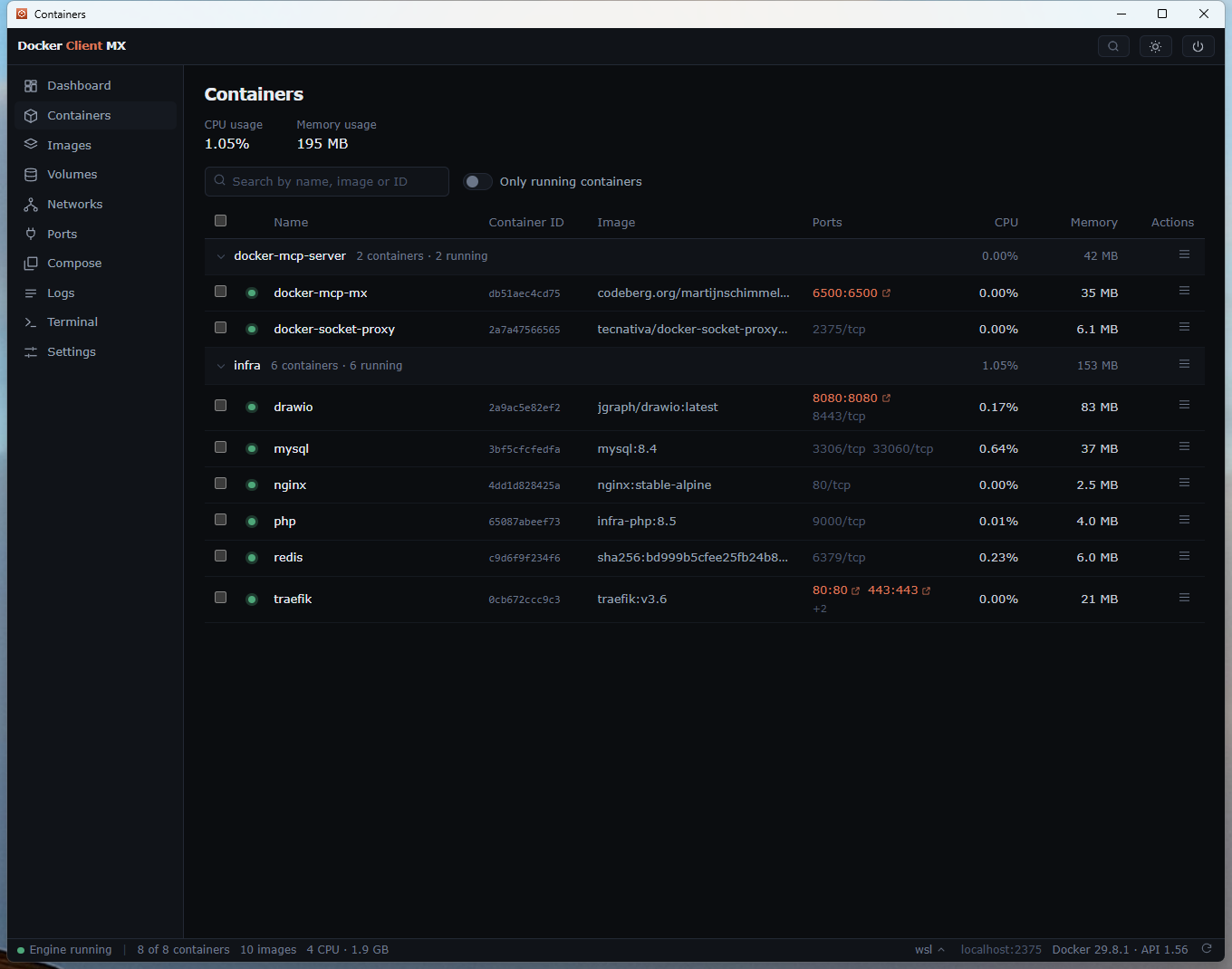
Fig. 1 — The containers page, grouped by compose project, with live CPU and memory per container.
Principles
Talks to your daemon. Doesn’t replace it.
Docker Client MX never installs or manages the engine. It finds your daemon the same way the Docker CLI does and gets to work.
Docker in WSL, with a proper window on it.
Designed around Docker running inside WSL on Windows. Switch Docker contexts straight from the status bar when you need another host.
Everything is one Ctrl+K away.
A command palette for every page and action. Cmd+K on macOS. Your mouse can take the afternoon off.
Everything you open Docker Desktop for.
Nine pages, one window. Each one does the job you came for, then gets out of the way.
Containers →
Grouped by compose project, with bulk start, stop, restart and remove. Live logs, a terminal, a file browser and one-click diagnosis on every container.
Images →
Pull with per-layer progress, run a container from an image, check the registry for updates, and recreate compose containers.
Volumes & networks →
List, remove and prune. Look inside a volume and change its files. Back it up to a .tar by hand or on a schedule, and restore it.
Checkup & reports →
One page that checks your setup against eleven rules and links to the fix for each. Plus a report of what runs on a machine, yours or another, as Markdown or HTML.
History →
The notifications you missed, a day of CPU and memory per container, and one page with everything the engine reported.
Background mode →
Runs in the system tray and notifies you when a container crashes, becomes unhealthy or hits its memory limit. Can start at login.
Yours to read →
English (the default), Dutch, German, French and Spanish, with technical terms kept in English. Light and dark theme, toggled in the header.
Optional · bring your own key
A container fell over? Ask Claude why.
The Claude tab helps you troubleshoot with the context of your containers and logs at hand. It is entirely optional and uses your own Anthropic API key. Leave it off and nothing leaves your machine.
Up and running in a minute.
Pick the way that suits your machine. All three talk to the daemon you already have.
Installer
Download Docker-Client-MX-Setup.exe from the Codeberg releases. It keeps itself up to date.
Download .exenpm
Run it straight away with npx, or install it globally. Needs Node 20 or newer.
$ npx docker-client-mx
$ npm i -g docker-client-mx
From source
Clone the repository and run the development build.
$ git clone https://codeberg.org/MartijnSchimmel/docker-client-mx.git
$ npm install
$ npm run dev